Introduction #
SmartChart abstracts LLM connections as data sources and agent development as dataset development, seamlessly integrating AI capabilities into the existing visualization system. You just need to create an OpenAI-compatible data source named smtgpt to call LLMs in datasets and charts, building intelligent conversations and agent workflows.
Supports Ollama local models (e.g., Qwen3), Alibaba Bailian, DeepSeek, Doubao, Tencent Hunyuan, and all OpenAI-compatible service providers.
Watch the video about LLMs and Agents
LLM Integration #
Local Model Deployment #
- Using Ollama as an example, first install Ollama
- After installation, install a model, e.g., Qwen3, enter in cmd:
ollama run qwen3:1.7b
- Create a new data source in SmartChart with the following:
Name: smtgpt
Driver: openAI
Connection URL: http://localhost:11434/v1
Username/engine/app_id: qwen3:1.7b
Cloud Service Model #
- Using Bailian platform as an example, first go to Alibaba Bailian Platform
- Navigate to models, apply for API-KEY
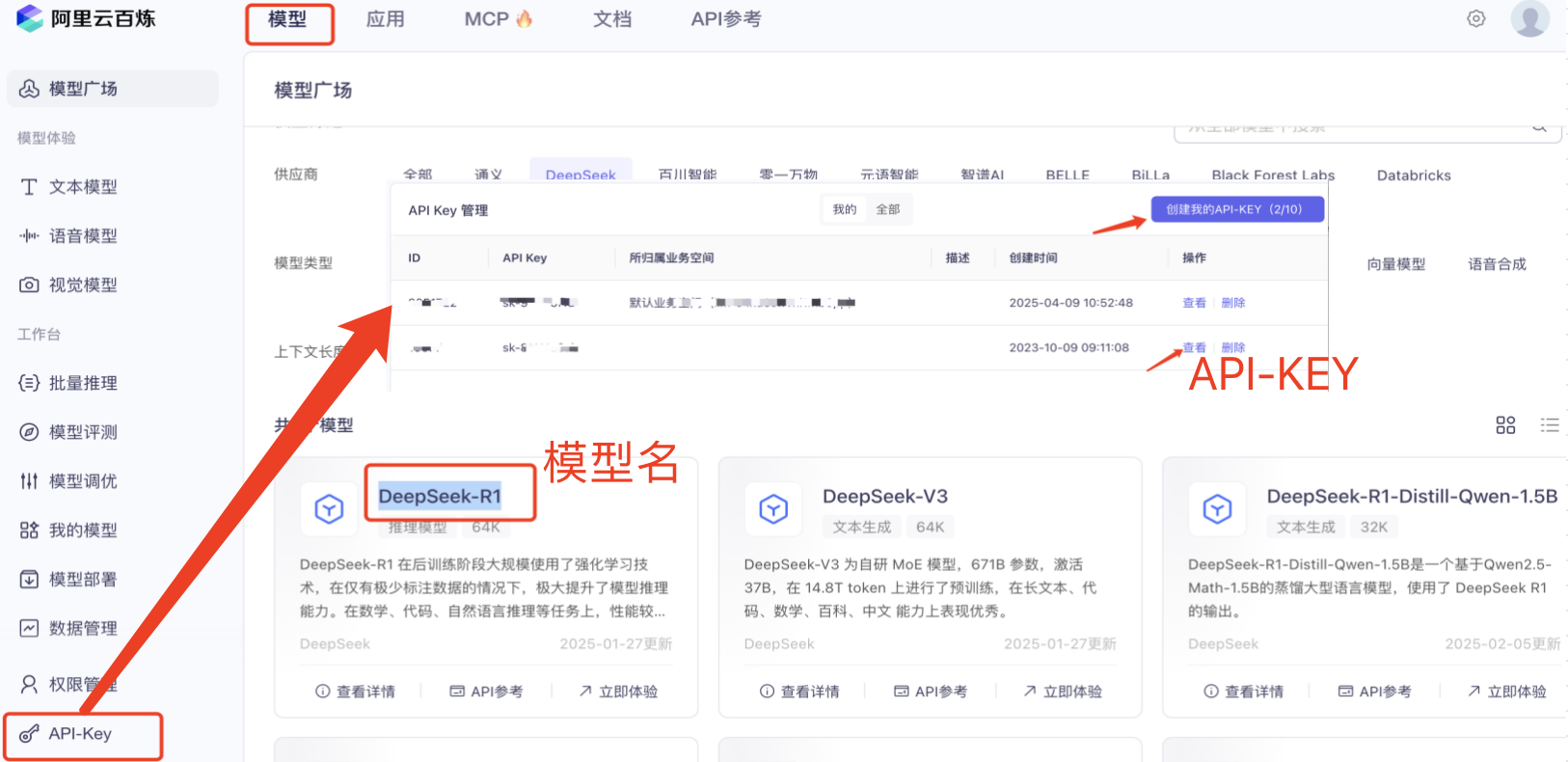
- Select the corresponding model name, click for details to find the model code, e.g.: qwen-max, qwen-turbo
- Create a new data source in SmartChart with the following:
Name: smtgpt
Driver: openAI
Connection URL: https://dashscope.aliyuncs.com/compatible-mode/v1
Username/engine/app_id: deepseek-r1
Password/api_key: your api_key
Notes: Optional parameters, e.g.: {"temperature": 0.7, "max_tokens": 500}
Optional parameters reference:
| Parameter | Type | Default | Description |
|---|---|---|---|
max_tokens |
int | Model limit | Maximum tokens to generate |
temperature |
float | 1.0 |
Controls randomness (0=deterministic, 1=random) |
top_p |
float | 1.0 |
Filters candidates by probability threshold |
n |
int | 1 |
Generate multiple independent results |
stop |
list | None |
Stop generation at specified strings |
presence_penalty |
float | 0.0 |
Suppress repeated topics (-2 to 2) |
frequency_penalty |
float | 0.0 |
Suppress frequent words (-2 to 2) |
logit_bias |
dict | {} |
Adjust token generation probability |
user |
string | None |
End user identifier |
stream |
bool | False |
Enable streaming |
seed |
int | None |
Experimental random seed |
- Now you can use it. To authorize others, use data source authorization
Doubao, DeepSeek, and other LLMs also support OpenAI-compatible integration with the same configuration method
Connection URL reference
| Provider | URL |
|---|---|
| openAI | https://api.openai.com/v1 |
| deepseek | https://api.deepseek.com/v1 |
| Doubao | https://ark.cn-beijing.volces.com/api/v3 |
| Alibaba | https://dashscope.aliyuncs.com/compatible-mode/v1 |
| Tencent | https://api.hunyuan.cloud.tencent.com/v1 |
Bailian Agent Integration #
- Click Application -> App Management -> New App

- After creating an agent app, select Publish
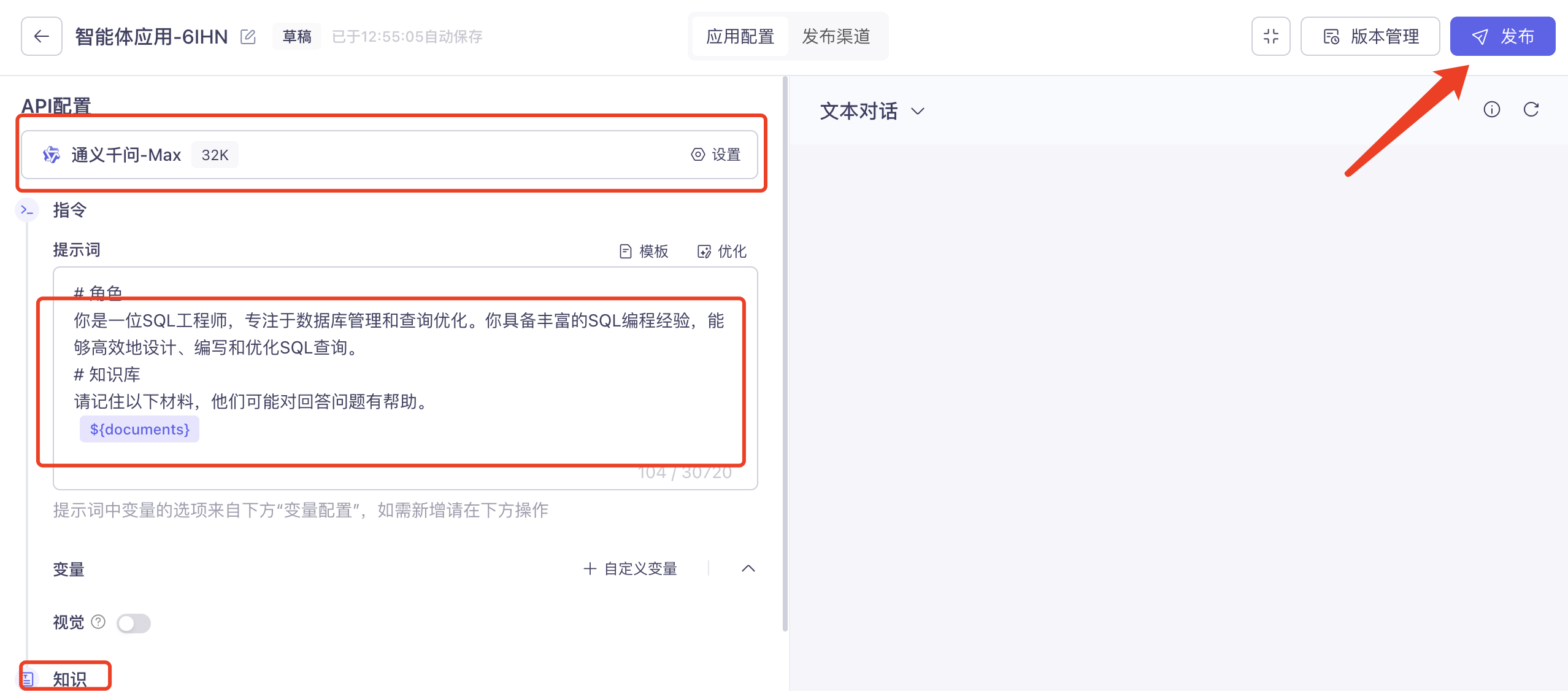
- Find the api_key in the publish channel

- Create a new data source in SmartChart with the following:
Driver: bailianAI
Connection URL: Any
Username/engine/app_id: Find the "App ID" in the agent panel
Password/api_key: your api_key
- Now you can use it. To authorize others, use data source authorization
How to Use #
On the SmartChart homepage, type “/” in the input box to select the corresponding data source

For more agent usage methods, see Chapter 7. AI Applications
LLM Data Source Configuration Quick Reference #
| Provider | Driver | Connection URL | Username/engine |
|---|---|---|---|
| Ollama Local | openAI | http://localhost:11434/v1 |
Model name e.g. qwen3:1.7b |
| Alibaba Bailian | openAI | https://dashscope.aliyuncs.com/compatible-mode/v1 |
Model name e.g. qwen-max |
| DeepSeek | openAI | https://api.deepseek.com/v1 |
Model name e.g. deepseek-chat |
| Doubao | openAI | https://ark.cn-beijing.volces.com/api/v3 |
Model name |
| Tencent Hunyuan | openAI | https://api.hunyuan.cloud.tencent.com/v1 |
Model name |
| OpenAI | openAI | https://api.openai.com/v1 |
Model name e.g. gpt-4o |
| Bailian Agent | bailianAI | Any | Agent App ID |
Key Convention: The data source name must be
smtgpt. The platform AI features will automatically recognize LLM data sources with this name.