Introduction #
The custom component management feature allows you to save developed graphics as local samples for quick reuse across multiple dashboards. No need to reconfigure SQL and JS code — simply call from the sample library. Ideal for accumulating and sharing standardized graphic components across teams.
| Operation | Description |
|---|---|
| Add Sample | Save current graphic configuration to local sample list |
| Remove Sample | Remove a selected sample from the list |
| Reuse Sample | Call from the sample library with one click when creating new graphics |
Use Cases #
During graphics development, when you complete a graphic’s configuration and logic, you can save it as a custom component for quick reuse in other dashboards, avoiding repetitive development.
Local Component Management #
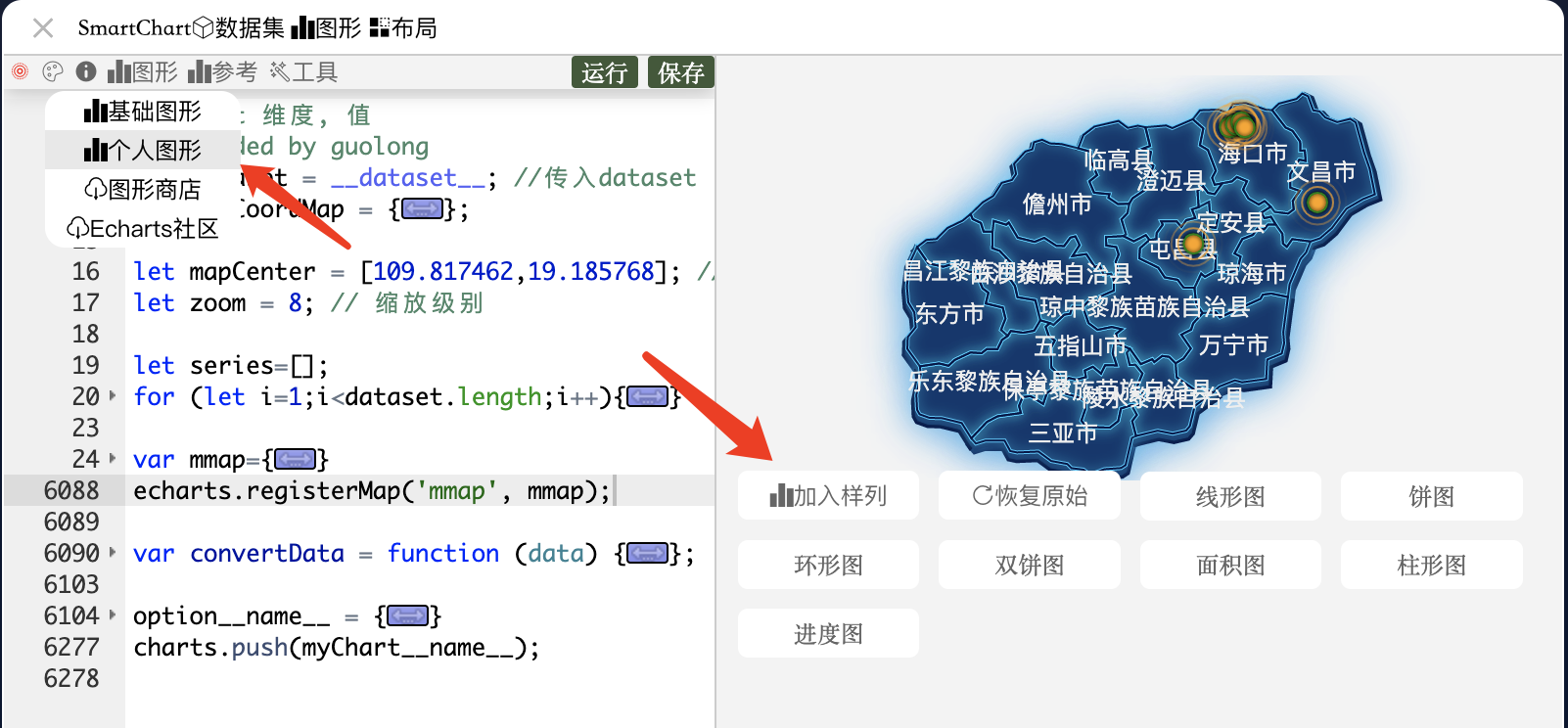
Manage custom graphics from the graphic editor menu:
- Click “Add Sample”: Save current graphic configuration to local sample list
- Click “Remove Sample”: Remove a selected sample from the list
Once saved, you can call from the sample library with one click when creating new graphics, directly reusing previously developed graphic components.
Tips #
- Naming Convention: Use meaningful names when saving samples (e.g., “Monthly Sales Bar-Line Chart”) for easier future lookup
- Parameter Reuse: SQL and JS code in samples are preserved; only adjust dataset bindings and parameters for the new scenario when reusing
- Team Sharing: Custom components are saved under the local account; for team sharing, consider publishing through the Graphics Store