Introduction #
SmartChart’s resource management allows uploading CSS, JS, images, fonts, and other static resources to the server, referenced via fixed paths in templates. Supports single file and ZIP batch upload, as well as custom data source files (Python) and JDBC JAR packages as drivers.
Click the menu in Template Development to upload resource files like CSS, JS, images
Video Tutorial
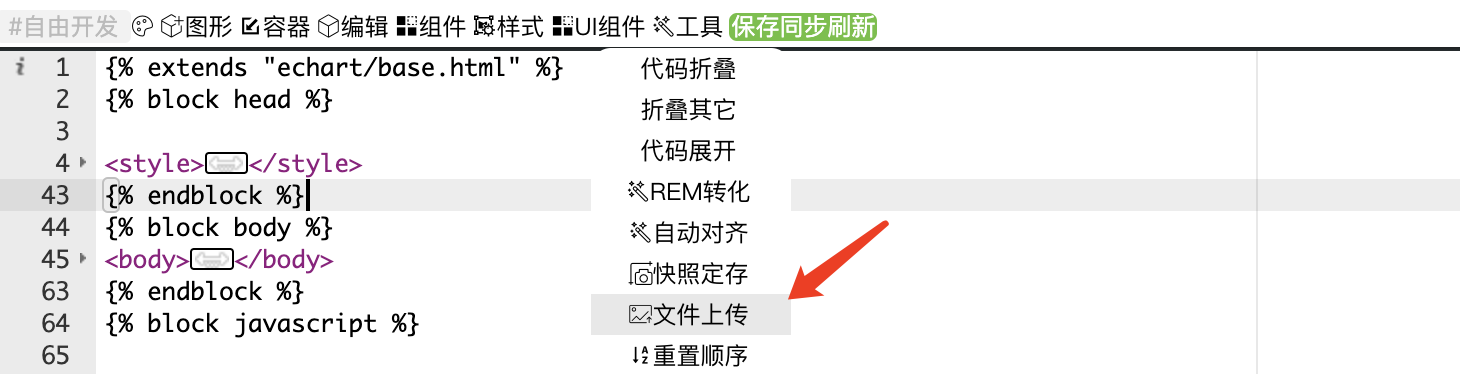
Note: New versions upgraded “File Upload” to “Resource Management”
Regular Upload #
Upload single files or ZIP packages. ZIP packages cannot contain Chinese filenames. After upload, the reference path is: /static/custom/{DashboardID}/…
Upload as Shared Resource #
Package resources as ZIP with name starting with usr_, e.g., usr_tp.zip
No path prompt after upload. Reference path: /static/custom/usr_tp/…
Upload Custom Data Source or JAR #
No path prompt after upload
Upload Management #
- Access “Resource Management” from homepage
- Super admin can see usr and custom dashboards for authorizing access to personal or shared resources
Resource Path Reference #
| Upload Type | Path Format | Example |
|---|---|---|
| Regular file | /static/custom/{DashboardID}/filename |
/static/custom/5/bg.png |
| Shared resource (usr_ ZIP) | /static/custom/{zipname_no_ext}/filename |
/static/custom/usr_tp/logo.svg |
| Custom source / JAR | No path, loaded internally | Enter filename (no extension) in driver field |
ZIP spec: Shared resource packages must start with
usr_, e.g.,usr_tp.zip; ZIP contents cannot have Chinese filenames.