首页
/
9. Crud
/
Crudactions
Introduction
#
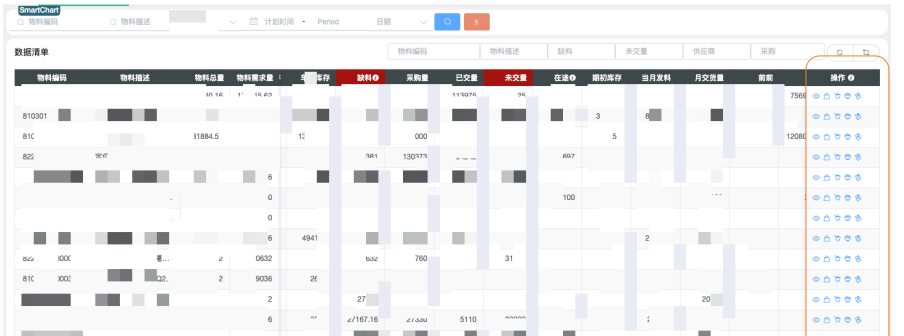
CRUD row actions display icon buttons on the right side of each table row. Clicking executes preset functions like viewing detail data, popping up graphics, or sending messages. Configure icon-to-dataset mappings in the config panel’s “View ds mapping” — the system automatically passes the entire row data to the dataset.
Config Format
Description
icon:datasetIDClick popup shows table or chart from dataset data
icon:datasetID!Popup shows dataset’s table/chart
icon:datasetID!!Execute dataset only, no popup
Use Cases
#
Click icon buttons on the right of each row to implement functions like viewing detail data, graphics, sending messages, etc.
Configuration
#
Configure “View ds mapping” in the “Data Management” panel: icon:dataset, comma-separated
e.g., el-icon-goods:5, el-icon-food:6
Use
ElementUI icons
Action Datasets
#
For the configured dataset (e.g., #5), the system passes the entire row data when clicked:
Data query — just write SQL, system auto-determines whether to show table or chart:
select a, b from table1 where a= '$a'
Can also execute any dataset action, such as sending emails, writing data, etc.
ElementUI Icon Reference
#
Common Icons
#
Name
Code
search
el-icon-search
setting
el-icon-setting
user
el-icon-user
phone
el-icon-phone
star-off
el-icon-star-off
star-on
el-icon-star-on
s-goods
el-icon-s-goods
goods
el-icon-goods
question
el-icon-question
info
el-icon-info
remove
el-icon-remove
circle-plus
el-icon-circle-plus
success
el-icon-success
error
el-icon-error
System Operation Icons
#
Name
Code
zoom-in
el-icon-zoom-in
zoom-out
el-icon-zoom-out
circle-check
el-icon-circle-check
circle-close
el-icon-circle-close
minus
el-icon-minus
plus
el-icon-plus
check
el-icon-check
close
el-icon-close
Name
Code
picture
el-icon-picture
picture-outline
el-icon-picture-outline
upload
el-icon-upload
upload2
el-icon-upload2
download
el-icon-download
camera
el-icon-camera
video-camera
el-icon-video-camera
message
el-icon-message
Time & Notification Icons
#
Name
Code
time
el-icon-time
bell
el-icon-bell
date
el-icon-date
Location Icons
#
Name
Code
location
el-icon-location
location-information
el-icon-location-information
Document & Folder Icons
#
Name
Code
document
el-icon-document
folder
el-icon-folder
folder-opened
el-icon-folder-opened
folder-add
el-icon-folder-add
tickets
el-icon-tickets
Name
Code
ticket
el-icon-ticket
s-order
el-icon-s-order
s-home
el-icon-s-home
s-data
el-icon-s-data
s-shop
el-icon-s-shop
Direction & Navigation Icons
#
Name
Code
caret-top
el-icon-caret-top
caret-bottom
el-icon-caret-bottom
caret-left
el-icon-caret-left
caret-right
el-icon-caret-right
arrow-left
el-icon-arrow-left
arrow-right
el-icon-arrow-right
arrow-up
el-icon-arrow-up
arrow-down
el-icon-arrow-down
Other Icons
#
Name
Code
share
el-icon-share
s-flag
el-icon-s-flag
s-marketing
el-icon-s-marketing
s-cooperation
el-icon-s-cooperation
s-platform
el-icon-s-platform
refresh
el-icon-refresh
refresh-left
el-icon-refresh-left
refresh-right
el-icon-refresh-right
delete
el-icon-delete
delete-solid
el-icon-delete-solid